Blog
- Details
MongoDB is a cross-platform document-oriented database program.
Classified as a NoSQL database program, MongoDB uses JSON-like documents with schema.
Source: Wikipedia
MongoDB 4.0 was released on 2018-08-06
New 'wow' features of MongoDB 4.0:
- multi-document ACID transactions
- data type conversions
- 40% faster shard migrations
- non-blocking secondary replica reads
And some other niceties:
- native visualizations with MongoDB Charts
- Compass aggregation pipeline builder
- Stitch serverless platform
- SHA-2 authentication
- Mobile database
- HIPAA compliance to the MongoDB Atlas database service
- free community monitoring service
- Kubernetes integration
While the new features in MongoDB 4.0 are great,
the latest Ubuntu version 18.04 official repository still installs MongoDB version 3.6
To get the current version of MongoDB
> mongo --version
To install MongoDB version 4.0, you need to install from MongoDB's repository.
Instructions to install MongoDB 4.0 and some hurdles I encountered follow:
1) Add the MongoDB repo
> sudo vi /etc/apt/sources.list.d/mongodb-org-4.0.list
deb [arch=amd64] https://repo.mongodb.org/apt/ubuntu bionic/mongodb-org/4.0 multiverse
2) Add MongoDB the repo key
> sudo apt-key adv --keyserver hkp://keyserver.ubuntu.com:80 --recv 9DA31620334BD75D9DCB49F368818C72E52529D4
3) Update your system
> sudo apt-get update
4) Install MongoDB 4.0
> sudo apt-get install mongodb-org
5) Status and restart MongoDB
> sudo systemctl status mongod
> sudo systemctl restart mongod
Hurdles:
If MongoDB does not start, there may be some issues with removing the prior MongoDB version.
Errors I encountered:
error processing archive /var/cache/apt/archives/mongodb-org-server_4.0.10_amd64.deb (--unpack):
error trying to overwrite '/usr/bin/mongod', which is also in package mongodb-server-core 1:3.6.3-0ubuntu1.1
error trying to overwrite '/usr/bin/mongos', which is also in package mongodb-server-core 1:3.6.3-0ubuntu1.1
error trying to overwrite '/usr/bin/bsondump', which is also in package mongo-tools 3.6.3-0ubuntu1
Some potential fixes
> sudo apt --fix-broken install
This by it self did not help
Remove prior MongoDB and other unused packages
> sudo apt autoremove
This did fix the issue and allow me to run MongoDB 4.0
To get version of MongoDB
> mongo --version
Also, if you accidentally tried to get the version from the daemon
> mongodb --version
MongoDB will start as your user, often sudo/root,
which may cause some MongoDB files to be created as root.
You may have to reset user/group permissions
> sudo chown -R mongodb:mongodb /data/mongodb/
-End of Document-
Thanks for reading
- Details
Microsoft Message Queuing or MSMQ is a message queue implementation developed by Microsoft and deployed in its Windows Server operating systems.
MSMQ is essentially a messaging protocol that allows applications running on separate servers/processes to communicate in a failsafe manner. A queue is a temporary storage location from which messages can be sent and received reliably, as and when conditions permit. This enables communication across networks and between computers, running Windows, which may not always be connected. By contrast, sockets and other network protocols assume that direct connections always exist.
Source: Wikipedia
If everything is working, messages are added to the queue by one application, and then typically read and removed from the queue by another application.
However, sometimes messages will get 'stuck' in the queue. While this is sometimes due to networking or application changes, the queue may back up if the receiving application is not running or running slower than normal.
Once the underlying problem has been fixed, depending on your application, the receiving application may never be able to catch up with the quantity of messages currently in the queue plus those still being added.
While you can purge the full queue:
Computer Management -> Services and Applications -> Message Queuing
Select your private queue, right click, All Tasks -> Purge
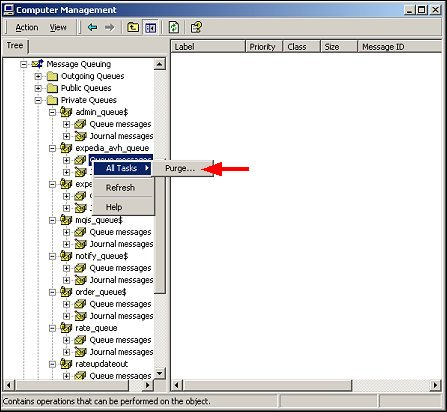
You may want to only purge the "old" messages.
Depending on your application, "old" could be seconds, minutes or hours.
The following PowerShell script will iterate over your private queues and remove "old" messages.
You can set the definition of "old" and you can preview the messages without removing.
###
# remove old messages for all local msmq queues
# msmq = microsoft messaging queuing
#
# 20190530 122800
# add options $showMsg and $dryRun
# 20190521 122800
# initial
#
#
# config
#
[System.Reflection.Assembly]::LoadWithPartialName("System.Messaging") | Out-Null
$utf8 = new-object System.Text.UTF8Encoding
$now = Get-Date
# remove messages older than
# $old = $now.AddDays(-1)
$old = $now.AddMinutes(-10)
# show details of message to be removed
$showMsg = 1
# run without removing
$dryRun = 1
#
# run
#
# get queues
$queuePaths = Get-MsmqQueue -QueueType Private | Select -Property QueueName;
if ($dryRun)
{
echo "dry run; would be "
}
echo "removing old messages for all local msmq queues"
echo ""
echo "nbr queues: $($queuePaths.Length); checking messages older than $($old)"
$queueCounts = Get-MsmqQueue -QueueType Private | Format-Table -Property QueueName,MessageCount;
echo $queueCounts
echo ""
pause
foreach ($queuePath in $queuePaths)
{
# for proper permissions, prepend .\
$localQueuePath = ".\$($queuePath.QueueName)"
echo "queue: $localQueuePath"
$queue = New-Object System.Messaging.MessageQueue $localQueuePath
# to read ArrivedTime property
$queue.MessageReadPropertyFilter.SetAll()
# get snapshot of all messages, but uses memory, and slower
# $msgs = $queue.GetAllMessages()
# echo " $($msgs.Length) messages"
# get cursor to messages in queue
$msgs = $queue.GetMessageEnumerator2()
# add a message so can test
# $queue.Send("<test body>", "test label")
# pause
$removed = 0
# foreach ($msg in $msgs)
while ($msgs.MoveNext([timespan]::FromSeconds(1)))
{
$msg = $msgs.Current
if ($msg.ArrivedTime -and $msg.ArrivedTime -lt $old)
{
if ($showMsg)
{
echo "--------------------------------------------------"
echo "ArrivedTime: $($msg.ArrivedTime)"
echo "BodyStream:"
if ($msg.BodyStream)
{
echo $utf8.GetString($msg.BodyStream.ToArray())
}
echo "Properties:"
echo $msg | Select-Object
echo ""
}
try {
if (!$dryRun)
{
# receive ie remove message by id from queue
$queue.ReceiveById($msg.Id, [timespan]::FromSeconds(1))
}
$removed++
} catch [System.Messaging.MessageQueueException] {
$errorMessage = $_.Exception.Message
# ignore timeouts
if (!$errorMessage.ToLower().Contains("timeout"))
{
throw $errorMessage
}
}
}
}
if ($dryRun)
{
echo "dry run; would have "
}
echo "removed $removed messages from $localQueuePath"
echo ""
}
pause
#
###
View on GitHub
-End of Document-
Thanks for reading
- Details
HTTP 302 responses, aka redirects, are not available to Angular as xmlHttpRequest does not support returning redirects; the browser acts before you can do anything about it.
If the response is an HTTP redirect:If the origin of the URL conveyed by the Location header is same origin with the XMLHttpRequest origin and the redirect does not violate infinite loop precautions, transparently follow the redirect while observing the same-origin request event rules.
refernce: stackoverflow
To act upon a 302 response,
You could check for specific data responses, or worse, override the status code 302 with a status code that is returned, such as 403, and act upon that.
X-Redirect header
However, a more generic solution is to add a custom redirect header, such as `X-Redirect` and act upon that. The value of `X-Redirect` should be the url you want to redirect to eg https://other.url.com/page
An $http example:
$http.get(orig_url).then(function(response) {
// do stuff
}, function (response) {
var headers = response.headers();
if ('x-redirect' in headers)
{
document.location.href = headers['x-redirect'];
}
return response;
}
}
For a more global solution, you could also use a HTTP Interceptor:
app.factory('myHttpInterceptor', function ($q, myCache) {
return {
request: function (config) {
return config;
},
response: function(response){
var headers = response.headers();
if ('x-redirect' in headers)
{
document.location.href = headers['x-redirect'];
}
return response;
},
responseError: function(rejection) {
switch(rejection.status)
{
case 302:
// this will not occur, use the custom header X-Redirect instead
break;
case 403:
alert.error(rejection.data, 'Forbidden');
break;
}
return $q.reject(rejection);
}
};
});
You can set the custom header server side.
For example, if you are using PHP Symfony:
$response = new Response('', 204);
$response->headers->set('X-Redirect', $this->generateUrl('other_url'));
return $response;
- Details
Steps to install zeroMQ in PHP 5.3, PHP 7.1, and 7.2 on Windows
- download the appropriate dll for you version of PHP and OS
zmq at php pecl
zmq 1.1.2 for PHP 5.3 to 5.6
zmq 1.1.3 for PHP 7.0 to 7.2
Most likely you want your PHP version, x64, and Thread Safe
but you may have a x32 version of PHP
$ php -i | grep Architecture
Architecture => x64
- for PHP 5.3
download 5.3 Thread Safe (TS) x86
extract and copy the dlls
copy libzmq.dll into
C:\wamp\bin\php\php5.3.4
there is no libsodium.dll in PHP 5.3
copy php_zmq.dll into
C:\wamp\bin\php\php5.3.4\ext
add the extension to your php.ini,
usually with the other Dynamic Extensions
extension=php_zmq.dll
- for PHP 7.1
download 7.1 Thread Safe (TS) x64
extract and copy the dlls
copy libzmq.dll and libsodium.dll into
C:\laragon\bin\php\php-7.1.20-Win32-VC14-x64
there is an extra dll libsodium.dll for PHP 7.1
copy php_zmq.dll into
C:\laragon\bin\php\php-7.1.20-Win32-VC14-x64\ext
add the extension to your php.ini, usually with the other Dynamic Extensions
extension=php_zmq.dll
- for PHP 7.2
download 7.2 Thread Safe (TS) x64
extract and copy the dlls
copy libzmq.dll into
C:\laragon\bin\php\php-7.2.11-Win32-VC15-x64
there is no libsodium.dll after PHP 7.1
copy php_zmq.dll into
C:\laragon\bin\php\php-7.2.11-Win32-VC15-x64\ext
add the extension to your php.ini, usually with the other Dynamic Extensions
extension=zmq
- verify by viewing php info
$ php -i | grep zmq
zmq
libzmq version => 4.1.3